From delegation to deliverables — for your whole team.
Claude Cowork is for you. CoWork Enterprise is for your team. Assign the repetitive, messy, time-consuming work across every app your business runs on — and come back to finished outputs you can actually use.
One place for your team's AI. Works with the tools you already pay for. You approve what it does before it does it.
Completed in 23 seconds · Everyone on your team can see what happened · Next run: Fri 4:00pm
Apps used:Your project toolYour team docsYour team channelWorks with the apps your team already uses
Finance / Bookkeeping
StripeQuickBooksSlack
Every Monday: reconcile weekend Stripe revenue against QuickBooks, flag anything over $250 that doesn't match, post a clean summary to the finance channel.
Sales Ops
HubSpotGmailYour CRM
When a deal moves to 'Proposal Sent': pull the contact details, then schedule a follow-up email for 3 days later if there's no reply yet.
Customer Success
IntercomNotionSlack
Weekly: pull the top support questions, update the team's 'Known Issues' doc, and post the top 5 to the success channel.
Operations
Google DriveNotionGmail
Scan the contracts folder for anything expiring in the next 30 days, summarize the key terms, and email the owner with a renewal checklist.
Marketing
Search ConsoleHubSpotYour CMS
Daily: pull campaign performance, flag any landing page with a sudden drop in conversions, suggest one fix for you to review.
Your team
Your appsYour toolsYour workflow
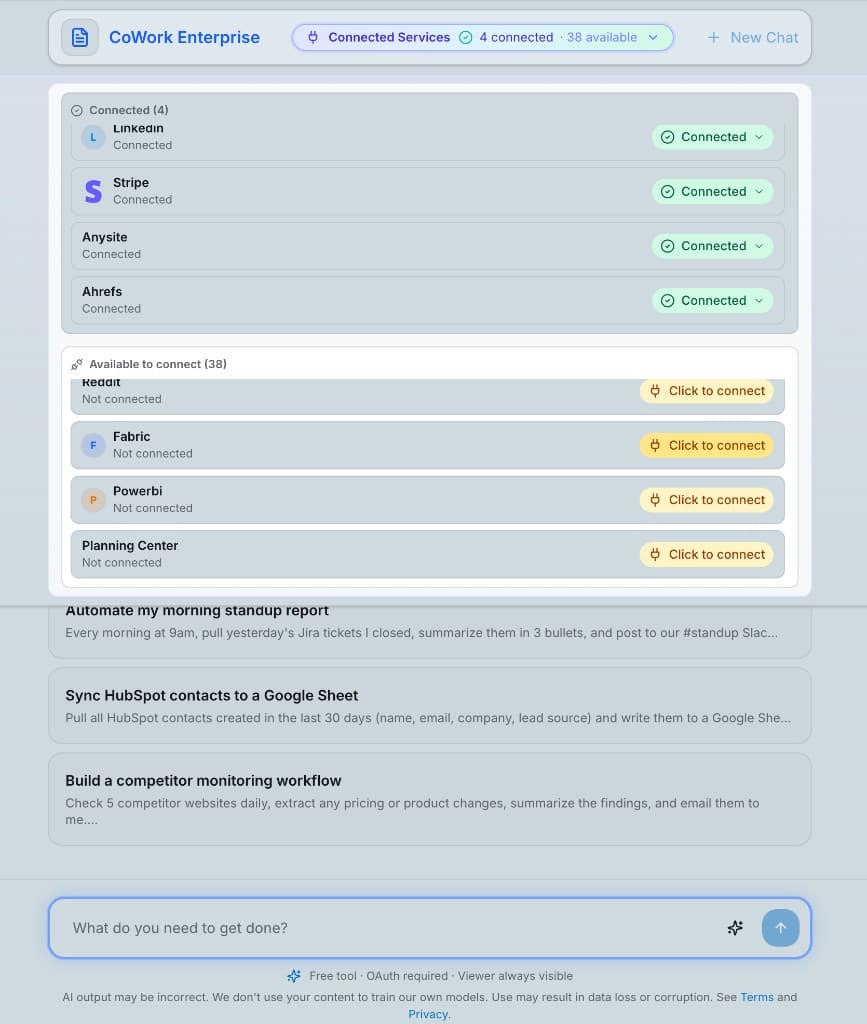
Connect any tool your team already uses. Describe what you want done. Approve the plan. Come back to finished work.
CoWork Enterprise works with the apps your team already pays for — no new tools to learn, nothing new to install.
How it works
Two steps. No downloads. Works in the browser tab you have open right now.
01
Connect the apps your team uses
Sign in to each app once — Gmail, Slack, HubSpot, QuickBooks, whatever your team runs on. CoWork connects with your existing logins.
02
Delegate the work
Describe the outcome in plain English. CoWork proposes a plan, you approve, and the work gets done across your apps. Save it to run again, or put it on a schedule.
Work across every team
Finance, sales, ops, marketing — the whole team delegates the repetitive work to one place.
Finance
Reconcile Stripe payouts against QuickBooks without the spreadsheet
Pull together the weekly P&L from your accounting data
Catch invoice anomalies before month close
Sales
Re-engage cold deals with personalized follow-ups
Turn sales call notes into product feedback
Keep your pipeline moving with the right next step at the right time
Customer Success
Pull support trends into a weekly digest your team can act on
Keep the 'Known Issues' doc current without the nag
Summarize every call into notes and follow-up tasks
Operations
Produce the weekly ops report from your usual data sources
Onboard new hires: set up accounts, send docs, schedule intros
Keep contract renewal dates from slipping through the cracks
Marketing
Pull campaign performance into a clean weekly update
Draft the newsletter from blog posts and announcements
Watch for brand mentions and surface what's trending
Owner / Founder
Get the one weekly dashboard that pulls from every tool
Delegate the admin work that eats up your week
See what the whole team's AI is doing — one place, one record
Claude Cowork is for you. CoWork Enterprise is for your team.
Both are great at delegation. Here's where they differ.
CoWork Enterprise
Claude Cowork
Works in the browser — nothing to install
Connects to your apps with your existing logins
Works across the apps your team pays for (Gmail, HubSpot, QuickBooks, etc.)
Partial
Shared team workspace — not one-user-per-laptop
Audit trail — everyone sees who did what
Works on any machine — Mac, Windows, Chromebook
Remembers context next week, not just this session
Approval-first. Auditable. Team-ready from day one — not bolted on later.
Approve before it acts
For anything that changes real data, CoWork shows you the plan and waits. You can redirect, refine, or cancel at any point.
Audit trail built-in
Every action is logged — who asked, what CoWork did, what changed. Nothing happens in the dark.
Connects with your existing logins
No new passwords to manage. You grant CoWork access through the same secure login flow your apps already use. Revoke anytime.
Team admin controls
On the team plan: single sign-on, roles for who can do what, and one place to see everything happening across the org.
Your data stays yours
Your logins are encrypted and stored in your account. We never train on your work or share it with third parties.
Nothing installed — anywhere
Browser-based means no desktop app on every laptop, no IT project, no security review for new software.
Frequently asked
How is this different from a chat AI like ChatGPT or Claude?
Chat AIs explain what to do. CoWork Enterprise connects to the apps your team already uses and actually does it — sends the emails, reconciles the data, updates the docs, posts the summary. You come back to finished work, not a wall of text.
How is this different from Claude Cowork?
Claude Cowork is an app you install on one person's laptop that works with the files on that laptop. CoWork Enterprise is a shared team workspace that runs in the browser and works across the apps your whole business uses — so one person's work doesn't get locked on one machine.
Do I need to download anything?
No. CoWork Enterprise runs in your browser. No desktop app, no terminal, no IT project. Open it in a tab and start.
How does it connect to our apps?
Through the same secure login your apps already use. You sign in to each app once and grant access — the same way you would when connecting a new tool to Slack or Google. You can revoke access anytime.
Will it change things without asking?
No. CoWork is approval-first. For anything that changes real data, it shows you the plan first and waits for your go-ahead. You can edit, redirect, or cancel at any point.
What apps can I connect?
The ones your team already uses — Gmail, Slack, HubSpot, QuickBooks, Stripe, Notion, Linear, Salesforce, Intercom, Google Drive, and more. If you have a login for it, we probably support it.
Can I set up workflows to run automatically on a schedule?
Yes. Any workflow you like can be saved and put on a schedule — daily, weekly, or custom. It runs on our infrastructure so you don't need to leave your laptop open.
Does it remember context between sessions?
Yes. Saved workflows remember what you taught them last time, so you're not re-explaining context every week.
Who on our team can use it?
Anyone — finance, sales, ops, marketing, customer success, the founder. It's built for the whole business, not just engineers. The team plan includes admin controls so you can decide who gets access to what.
What's included in the 14-day trial?
Full access to CoWork Enterprise and the rest of APIFunnel. No credit card required to start. Cancel anytime.
Ready to delegate the work your team keeps putting off?
Start a 14-day free trial. Connect your first app, describe your first job, and see what an AI that actually gets work done can do for your team.